CoreHandler.js
This is one of the most important files of the whole framework.
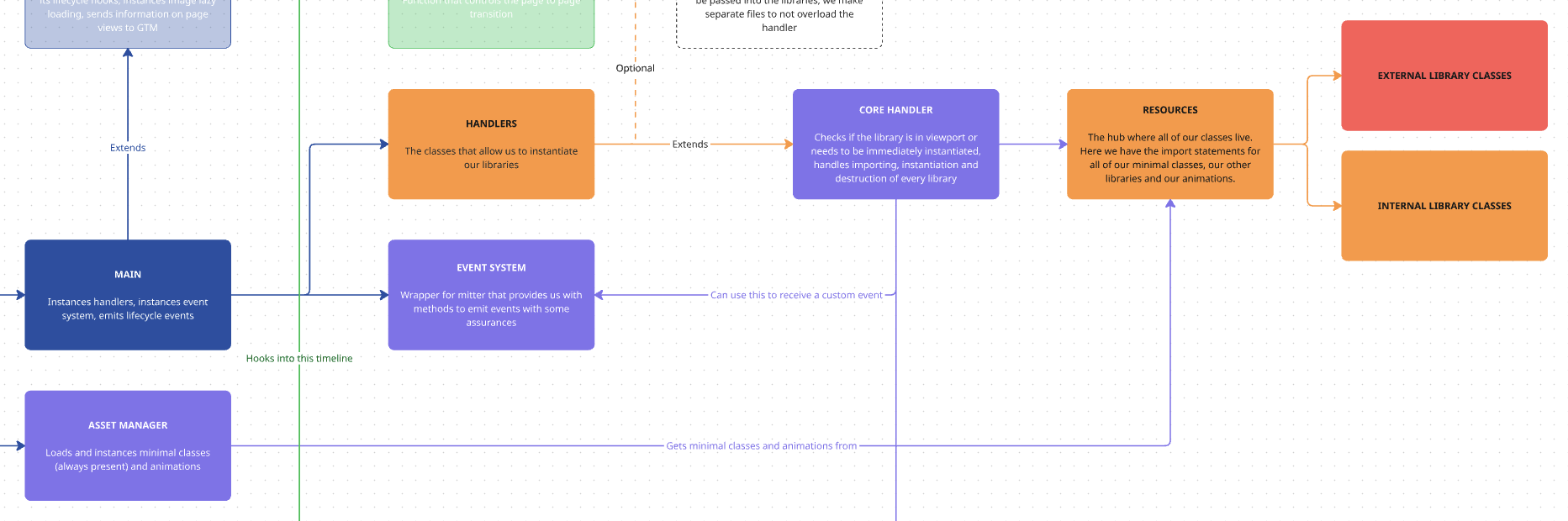
This file decides when each library gets imported, either on page load or on scroll event, and is also in charge of destroying all instances when changing the page.
This class is extended by all of our handlers, and is in charge of applying the configurations passed on by them to the classes we are instantiating.
getLibraryName(name) { this.libraryName = name;}The simplest method for this class is to assign the library name from the handler, so we can search for that library in the Manager and our resources array to import it in case it’s not yet in the Manager, store it afterwards and manage its instances.
assignInstances()
Section titled “assignInstances()”Our handlers will call this method. This is an example of how our handlers will do this:
this.emitter.on("MitterContentReplaced", async () => {    this.DOM = this.updateTheDOM;
    super.assignInstances({        elementGroups: [            {                elements: this.DOM.marqueeElements,                config: this.config,                boostify: { distance: 100 },            },        ],    });});
So on every page load, we will be using our assignInstances method. And that method will receive an array of element groups, each with a distinct configuration.
async assignInstances(payload) { const { elementGroups, forceLoad } = payload; if (elementGroups.length == 0) return; ...}First thing our method does is to extract those element groups and the optional ‘forceLoad’ property. This property would allow us to import a library on page load even if it’s not in the viewport, and it’s what we use to make our Anchor library work properly.
If we do not have element groups, we get out of the function.
for (const [index, configuration] of elementGroups.entries()) {            const { elements, config, boostify } = configuration;            const isPresent = elements.length > 0;            if (!isPresent) continue;
            // Check if the library is already in the Manager, get the asset if not, check if modifies height            this.library = this.Manager.getLibrary(this.libraryName);            if (!this.library) this.asset = await loadLibrary({ libraryName: this.libraryName });            if (!this.asset) {                this.debug.error(`Library ${this.libraryName} not found`, "import");                return;            } else if(typeof this.asset == 'string') {                this.debug.import(this.asset)                return;            }
            const modifiesHeight = await this.checkHeight({ asset: this.asset });
            for (const [intIndex, element] of elements.entries()) {                ...            }        }
Then we loop over our element groups, and we do this with a for...of loop because we need to ensure the asynchronous operations inside it are completed before going to the next element.
We extract our elements, configurations and boostify specifications from our payload and we start by checking if our elements array contains any. In the handler, we would have sent the result of a querySelectorAll method, so if the element we search for is present in the page, we go on, if not, we go on to the next element of the loop.
After that, we check if we have our library in the Manager. If not, we use our loadLibrary method to import it.
Once we got our asset we can check if the library has the modifyHeight property using our checkHeight() method:
async checkHeight({ asset }) { let modifiesHeight; if (this.library) { this.debug.import(`✅ library ${this.libraryName} was in manager `, { color: "green" }); modifiesHeight = this.Manager.librariesHeight.includes(this.libraryName); } else { modifiesHeight = asset?.options?.modifyHeight; } return modifiesHeight; }This method checks in the Manager if the library was there and in our asset if it wasn’t.
And once we have all the information we need about our library, we can work with the elements themselves to create the instances for the library.
for (const [intIndex, element] of elements.entries()) {    const boostifyEventName = `${this.libraryName}-${index}-${intIndex}`;
    // Instant load block - comes from Anchor or lib inside lib    const shouldLoadInstantly = (modifiesHeight && forceLoad) || forceLoad;
    if (shouldLoadInstantly) {        await this.instantLoad({ asset: this.asset, element, config, modifiesHeight, index, intIndex });        continue;    }
    // Check if the library is in the viewport    const inViewport = this.Manager.libraries.isElementInViewport({        el: element,        debug: this.terraDebug,    });
    ...}
First thing we do is check if our element is in the viewport using one of our minimal libraries, iselementInViewport.
We will use this information to know when we need to instantiate our library.
Afterwards, we check if the library is marked to load instantly. This is determined by it being a height modifying library and by the forceLoad property in the element groups.
We have the option to create events in boostify click, which are useful for libraries like the Modal, where we need the library to be imported and instantiated when the user clicks the button, not before. To trigger this type of event we need to specify it from our handler.
if (boostify && boostify.method == "click") {    this.boostify.click({        distance: boostify ? boostify.distance : this.boostifyConfig.distance,        name: boostifyEventName,        element,        callback: async () => {            // Double-check instance doesn't exist when callback fires            if (this.Manager.hasInstanceForElement(this.libraryName, element)) return;
try { await this.importLibrary(this.asset, "boostify"); await this.createInstance({ element, config, modifiesHeight, method: "Boostify click", }); } catch (error) { console.error(error); this.debug.error(`⚠️ Error loading ${this.libraryName}`, "import"); } }, });}events() { this.emitter.on("MitterContentReplaced", async () => { this.DOM = this.updateTheDOM; // Re-query elements each time this is called
super.assignInstances({ elementGroups: [ { elements: this.DOM.modalButton, config: this.config, boostify: { method: 'click', distance: 30 }, }, ], }); }); ...}And then, for our regular viewport and boostify scroll elements, we use the following part of the code:
else if (inViewport && !shouldLoadInstantly) {    try {        await this.importLibrary(this.asset);        await this.createInstance({ element, config, modifiesHeight, method: "Viewport" });    } catch (error) {        console.error(error);        this.debug.error(`⚠️ Error loading ${this.libraryName}`, "import");    }} else if (!inViewport && !shouldLoadInstantly) {    // As library was not deemed necessary to import on page load, import and instance on scroll    this.boostify.scroll({        distance: boostify ? boostify.distance : this.boostifyConfig.distance,        name: `${this.libraryName}-${index}-${intIndex}`,        callback: async () => {            // Double-check instance doesn't exist when callback fires            if (this.Manager.hasInstanceForElement(this.libraryName, element)) return;
            try {                await this.importLibrary(this.asset, "boostify");                this.createInstance({                    element,                    config,                    modifiesHeight,                    method: "Boostify scroll",                });            } catch (error) {                console.error(error);                this.debug.error(`⚠️ Error loading ${this.libraryName}`, "import");            }        },    });}
In here we check, if the element is in the viewport, we import the library and we make use of our createInstance method.
If it is not, we do the same process but we send everything to our boostify library, which will be in charge of importing the library and creating the instance once the user has scrolled inside the page.
createInstance()
Section titled “createInstance()” createInstance({ element, config, modifiesHeight, method }) { const Library = this.library; try { const conf = config({ element });
this.Manager.addInstance({ name: this.libraryName, instance: new Library({ element, el: element, ...conf }), element, method, }); // Use requestAnimationFrame to wait for the next paint cycle, // ensuring DOM has fully updated before refreshing ScrollTrigger await new Promise((resolve) => { requestAnimationFrame(() => { requestAnimationFrame(() => { updateScrollTriggers({ Manager: this.Manager }); resolve(); }); }); }); } catch (error) { console.error(error); this.debug.instance(`⚠️ Error instancing ${this.libraryName} in CoreHandler, check console`, { color: "red", }); } }Now, our create instance method picks up the configuration we passed on with the element group, instantiates the class and adds it to the Manager’s instances.
If the library modifies the height of the page, we refresh all scroll triggers so they’re always up to date. We use the double rAF pattern to detect when the library has finished loading and then update them.
destroyInstances()
Section titled “destroyInstances()”This is the method we use to destroy all instances of our libraries when we travel to a new page. This method is called in
destroyInstances(payload) { this.debug.instance(`❌ Destroy: ${this.libraryName}`, { color: "red" }); const libraryEvents = this.boostify.events.filter((e) => e.name && e.name.includes(this.libraryName)); if (libraryEvents) { libraryEvents.forEach((event) => { this.boostify.destroyscroll({ name: event.name }); }); } const instances = this.Manager.instances[this.libraryName]; if (instances && instances.length > 0) { instances.forEach((instance, index) => { if (instance.instance.destroy && typeof instance.instance.destroy === "function") { instance.instance.destroy(payload?.destroyArgs); } else { this.debug.error(`⛔️ Library ${this.libraryName} has no destroy method`); } }); this.Manager.cleanInstances(this.libraryName); } }First thing we do is destroy all boostify events related to this class so they won’t remain if we change the page before they have been executed.
Then, we get all instances for the library and go one by one executing their destroy() method. If they do not have one, our debugger will let us know.
This method is called in our MitterWillReplaceContent event in our handlers:
this.emitter.on("MitterWillReplaceContent", () => { if (this.DOM.marqueeElements.length) { super.destroyInstances(); }});Knowledge Check
Test your understanding of this section
Loading questions...