Pardot – Forms
Pardot provides different ways to collect and process form data.
At Terra, we use Pardot forms to send structured data from the website to Pardot, where it can later be synced with Salesforce and used in marketing automation.
This guide explains how forms work in Pardot, the difference between Forms and Form Handlers, and how data ownership and automation are handled in our projects.
Forms vs Form Handlers
Section titled “Forms vs Form Handlers”In Pardot, there are two ways of handling forms:
- Forms (created and rendered inside Pardot)
- Form Handlers (used when forms are built externally)
At Terra, we typically work with Form Handlers.
Form Handlers
Section titled “Form Handlers”A Form Handler is essentially an endpoint provided by Pardot.
- The endpoint is shared with the team implementing the form (usually Terra)
- Data is sent via POST requests
- Pardot maps incoming data to known fields
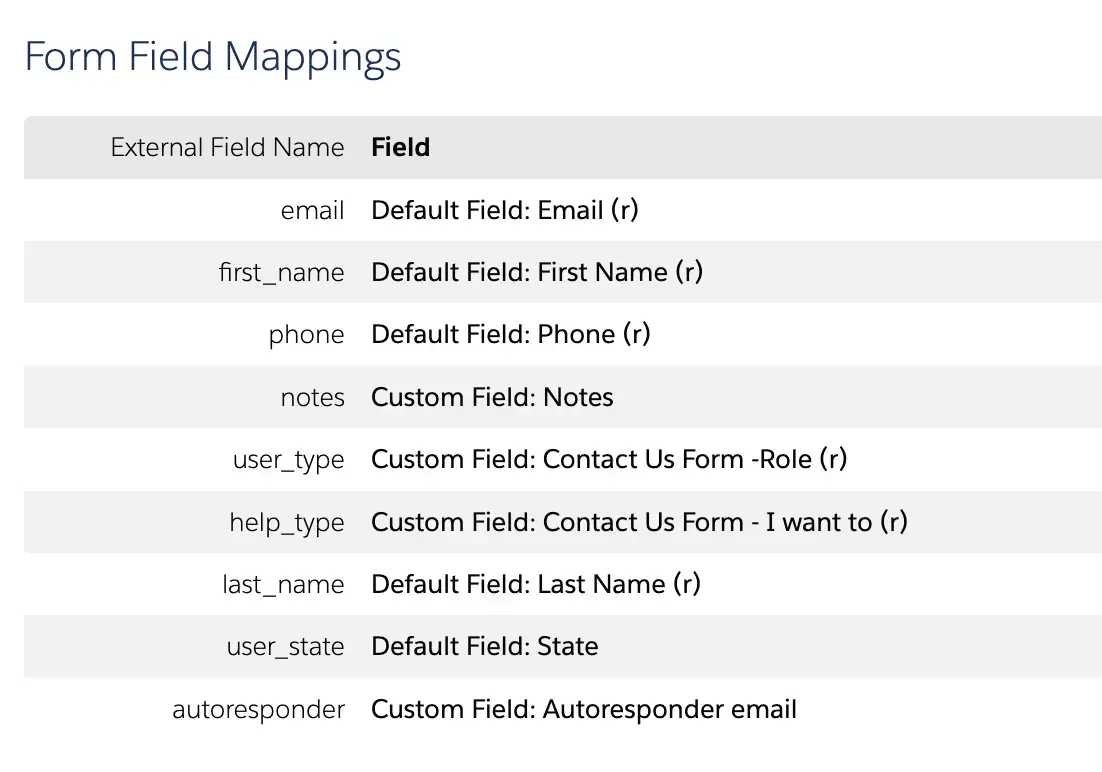
Example fields in a Form Handler:
- first name
- last name
- phone
- comments
- user type
- help type
- state
Each field is mapped using:
- a label (how the data is read)
- a prospect field (the Salesforce/Pardot field it connects to)
- optional validation (required or not)
Salesforce Fields and Ownership
Section titled “Salesforce Fields and Ownership”In real projects, Terra does not create Form Handlers or fields.
- All available fields come from Salesforce
- Fields must already exist in Salesforce to be selectable in Pardot
- If a field does not exist, the client must create it
Example:
- Asking for something common like email → usually already exists
- Asking for something unusual like shoe size → must be created in Salesforce first
Once created:
- the field becomes available in Pardot
- it can be mapped inside a Form Handler
Data Format
Section titled “Data Format”All incoming data from Form Handlers is received as text.
- Numbers are treated as strings
- Arrays or complex data structures are not expected
- No special formatting is required on Terra’s side
Prospect Data and Multiple Form Handlers
Section titled “Prospect Data and Multiple Form Handlers”One important concept is that multiple Form Handlers can update the same prospect.
This means:
- a user may submit different forms at different times
- each submission updates the same contact record
- data accumulates into a single prospect profile
For example:
- one form submits email + location
- another form submits phone number
- all data ends up linked to the same person
Automation and Salesforce Logic
Section titled “Automation and Salesforce Logic”Pardot is responsible for triggering automation, such as:
- sending region-based newsletters (e.g. Colorado)
- adding users to email journeys
- triggering conditional flows
In some cases, Pardot can:
- create a lead in Salesforce
- create a use case or other Salesforce entities
Summary
Section titled “Summary”- Terra works primarily with Pardot Form Handlers
- Forms are built externally and submit data to Pardot endpoints
- All available fields are defined in Salesforce and owned by the client
- Incoming data is treated as plain text
- Multiple form submissions can update the same prospect
- Pardot handles automation and syncing with Salesforce
Knowledge Check
Test your understanding of this section
Loading questions...